
Free planBestTrack feature article
Order tracking dashboard
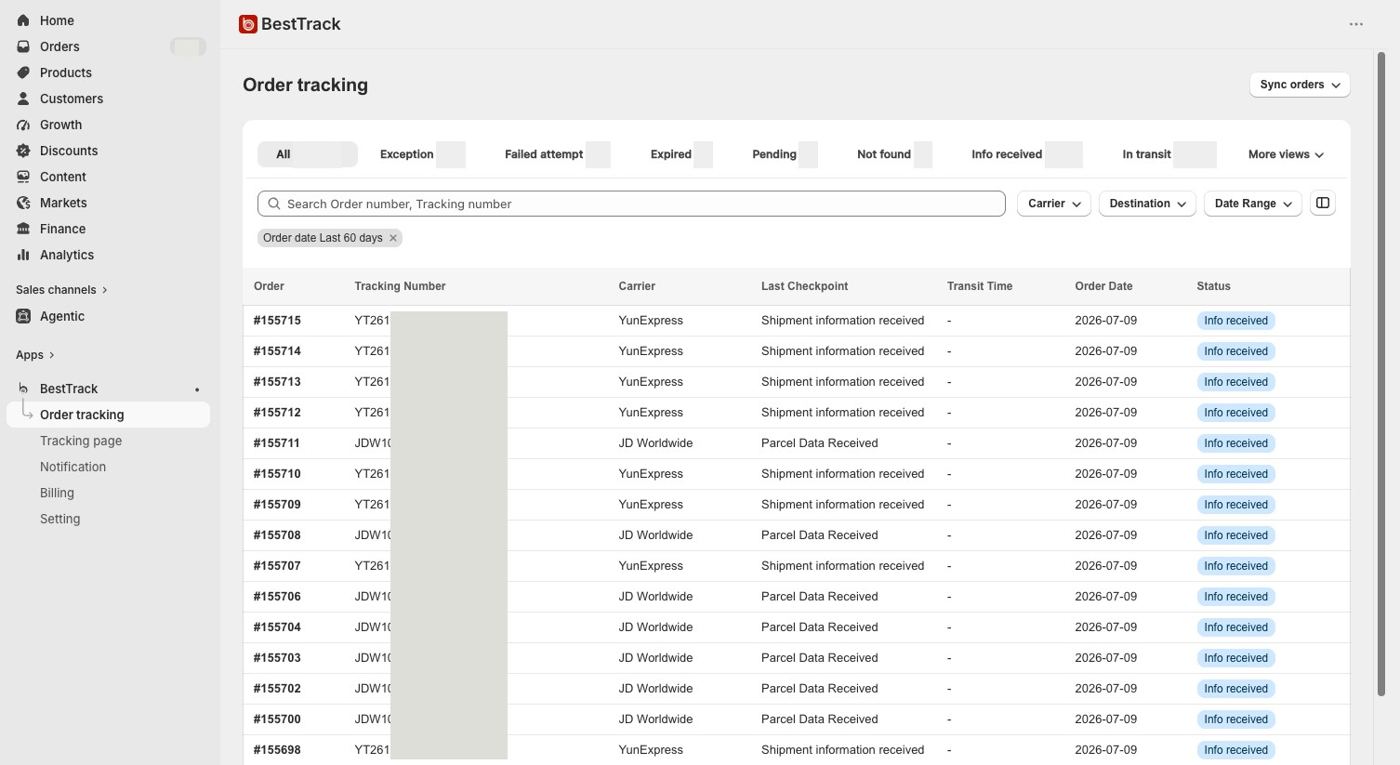
One place for every order — search, filter and spot problems before customers do.
What this feature does
- Use one unified table for every order instead of checking carrier websites individually.
- Filter by status, including Exception, Failed attempt, Expired, Pending, Not found, Info received and In transit.
- Search by order number or tracking number.
- Filter by carrier, destination or a custom date range.
- See the carrier, latest checkpoint, transit time, order date and status at a glance.
- Manual sync supports today or the previous 7, 30 or 60 days and counts toward the monthly allowance. Initial installation sync imports up to 300 orders without using that allowance.
- Export the current page, selected orders, filtered results or all waybills as CSV, up to 50,000 records per export.
- Shopify order updates and logistics callbacks refresh fulfillment and shipment information after the initial sync.