BestFeed AI is live — review and improve product content for AI discovery.Explore BestFeed →
Home/Apps/BestFeed AI
BestFeed AI app logo
AI visibility · Product contentBestFeed AI

Make every product easier for AI to understand.

BestFeed AI reviews Shopify product content across six dimensions, generates reviewable improvements, and syncs only the fields you approve back to Shopify.

0–100 score · six review dimensions · preview before syncWatch product demo
Illustration of AI scanning and improving Shopify product content
◆ Live on the Shopify App Store
◎ Six-dimension product review
⚡ One-click Shopify sync after approval
The AI-shopping content gap

AI can only work with the product information you give it.

Missing attributes, unclear use cases, thin FAQs, weak evidence, and stale details make products harder for AI systems to interpret. BestFeed AI turns those gaps into an explainable review and an actionable improvement plan.

Score content readinessA stable 0–100 AI Visibility Score for every reviewed product.
Know exactly what to fixSix dimensions mapped to the Shopify content fields that need attention.
Stay in controlPreview the diff, keep original fields, approve changes, and restore when needed.
Never edits priceTransactional pricing stays untouched.
Never edits inventoryStock and availability remain unchanged.
Never edits SKUOperational identifiers stay safe.
Approval before syncReview every field and keep any original value.
What BestFeed AI does

Review, improve, publish with control.

AI Visibility Score

A 0–100 score for every product.

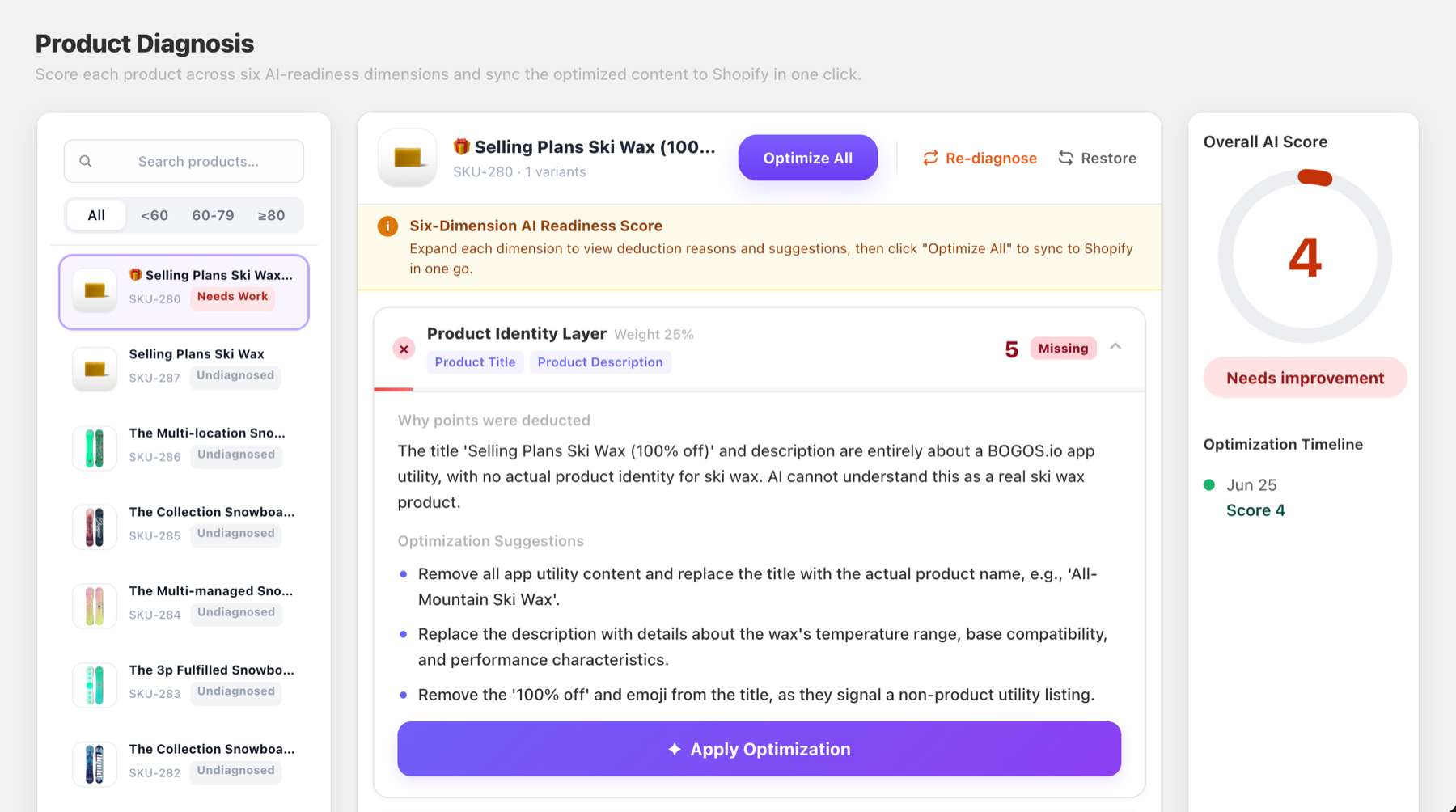
BestFeed AI scores identity, structured attributes, intent and use case, FAQ, authority, and freshness separately, with clear reasons and suggestions for every weak dimension.

Turn an abstract channel into an actionable review
BestFeed AI six-dimension product review with a score, issues and optimization suggestions
AI optimization suggestions

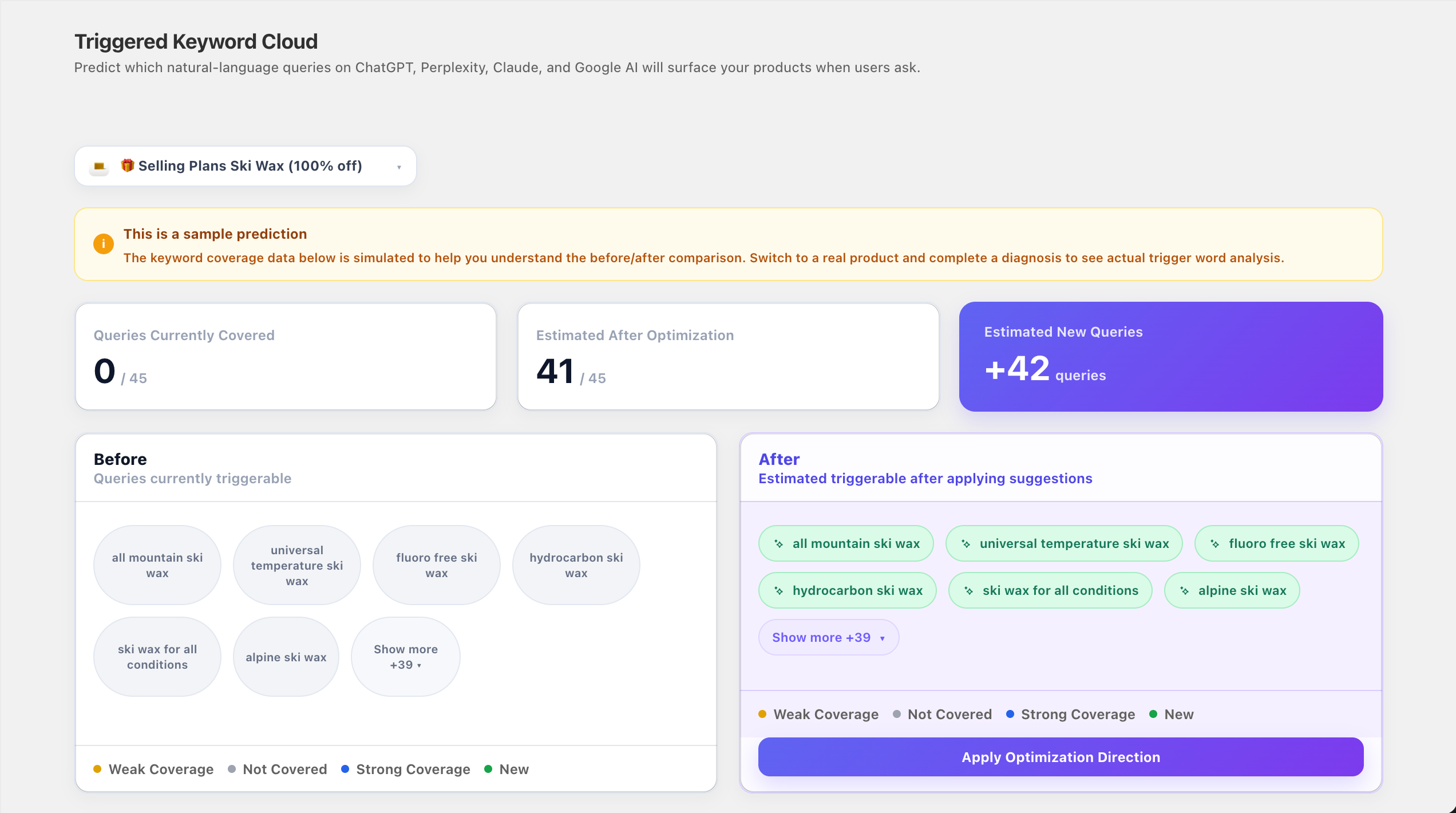
See which shopper questions your content can cover.

BestFeed AI predicts natural-language queries shoppers may use across ChatGPT, Perplexity, Claude, and Google AI, then compares current coverage with estimated coverage after optimization.

See which shopper intents the suggested content adds
BestFeed AI triggered keyword cloud comparing query coverage before and after optimization
Diff preview & rollback

Review every field before it changes.

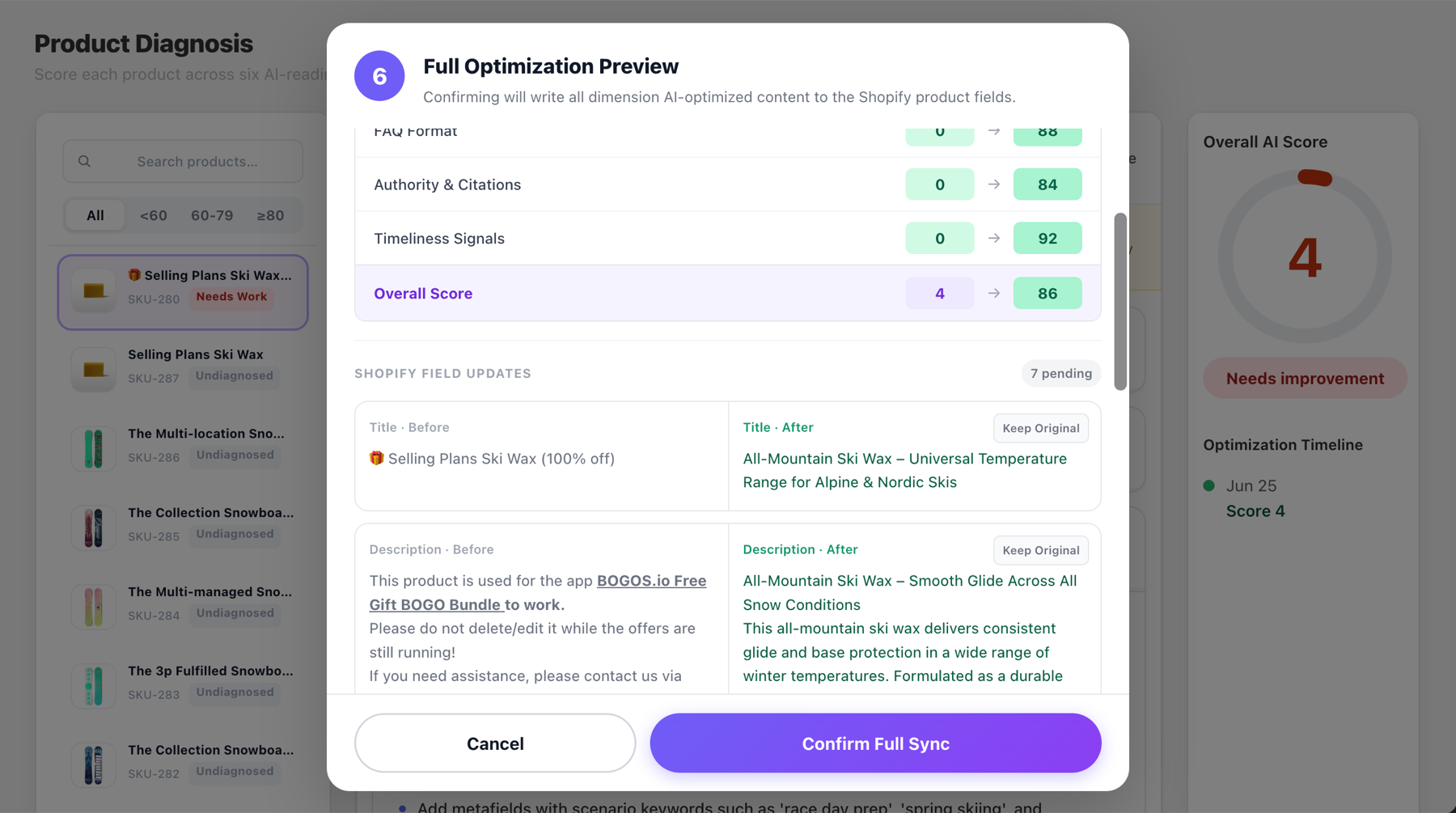
Scores and field-level content are shown side by side. Keep any original value and sync only the changes you approve.

Merchant approval remains the final step
BestFeed AI full optimization preview with before and after Shopify field content

Controlled generation

Generate titles, descriptions, SEO, tags, and metafield content from the review.

🔄

One-click Shopify sync

Write only approved content fields; existing tags are appended to, not deleted.

Reversible edits

Restore the snapshot from before the latest BestFeed sync without touching price, inventory, or SKU.

A controlled workflow

From review to approved improvement.

1

Install & import

Connect BestFeed AI and import active product snapshots; importing alone does not use review credits.

2

Choose & review

Select a product to receive its score, deduction reasons, and suggestions by dimension.

3

Review, approve & sync

Compare before and after, keep any original field, then sync approved content back to Shopify.

Start with real products

Start with the products that matter most.

Begin with high-value, high-traffic, or obviously incomplete products. If product content has not changed, BestFeed reuses the existing review so the score does not drift without a content change.

Freecurrent public plan
  • 5 product content reviews per month
  • Product snapshot imports do not use credits
  • Six-dimension analysis and optimization suggestions
  • Diff preview, Shopify sync, and restore
Install BestFeed AI ↗
Available usage and billing details are confirmed in the Shopify App Store and inside the app.
Shopify GEO field guide

Help AI find, understand and recommend your products.

A practical guide to preparing Shopify product content for discovery across ChatGPT, Google AI and Perplexity.

  • See what AI systems need before they can confidently cite a product.
  • Audit titles, attributes, use cases, FAQs and trust signals.
  • Turn the findings into a prioritized product-content checklist.
Complete field guide

Read the Shopify GEO Playbook.

Use a practical framework to audit product facts, structured data, buying-question coverage, evidence, freshness, and a 30-day rollout for Shopify catalogs.

AI Visibility StackBefore-and-after fixes30-day action plan

No email required. The full bilingual guide opens as an accessible web page; it does not guarantee ranking, inclusion, or recommendation on any AI platform.

The StandHigher portfolio

Focused apps for content, catalog operations, and post-purchase.

Each app installs separately and works on its own, while the same product team designs them around the Shopify merchant workflow.

FAQ

Good to know.

What does the AI Visibility Score measure?

It evaluates content readiness across identity, structured attributes, intent and use case, FAQ, authority, and freshness. It is a BestFeed review score, not an official ranking score from an AI platform.

Will it change price, inventory, or SKU?

No. BestFeed AI writes only approved content fields such as title, description, SEO, tags, and metafields. Price, inventory, SKU, tax, and shipping fields are outside its write scope.

Does BestFeed AI track AI traffic or revenue?

No. BestFeed AI currently reviews and improves product content; it is not an AI traffic-monitoring or revenue-attribution tool.

Are generated changes applied automatically?

No. You see a diff first and can keep any original field. Only approved content is synced after confirmation.

What is included in the current free plan?

Current product materials specify five product content reviews per month, while product snapshot imports do not use credits. Confirm the latest usage and billing details in the Shopify App Store and inside the app.


Give AI systems better product information to work with.

Install BestFeed AI, choose a real product, and start with an explainable six-dimension review.